1. Bring energy aboard
Shore power feeds an inverter/charger. Solar panels feed an MPPT controller. Suitable engine charging can provide another source.
Charging, stored energy and monitoring, planned together. Here is how the main components can support life aboard.
Browse Victron productsShore power feeds an inverter/charger. Solar panels feed an MPPT controller. Suitable engine charging can provide another source.
A suitable battery bank stores energy. Correctly specified protection, isolation and DC distribution connect it to charging equipment and onboard loads.
Compatible equipment shares information with Cerbo GX. View it on a GX Touch display, a supported chartplotter, or remotely through VRM when connected to the internet.
This is a functional overview. Cable sizes, protection, battery controls and electrical connections are designed for each boat.
Combines battery charging and an inverter for AC appliances. PowerAssist can supplement a limited shore supply from the battery.
The Distributor provides fused DC connections. The Lynx Shunt VE.Can measures battery use and shares monitoring data with the GX system.
Cerbo gathers compatible system data. The five-inch GX Touch 50 or seven-inch GX Touch 70 gives you an onboard screen.
Adds up to four compatible tank senders, helping bring tank levels into the same monitoring system.
Open these manufacturer drawings to see component relationships in more detail. They are reference examples, not a boat-specific installation design.
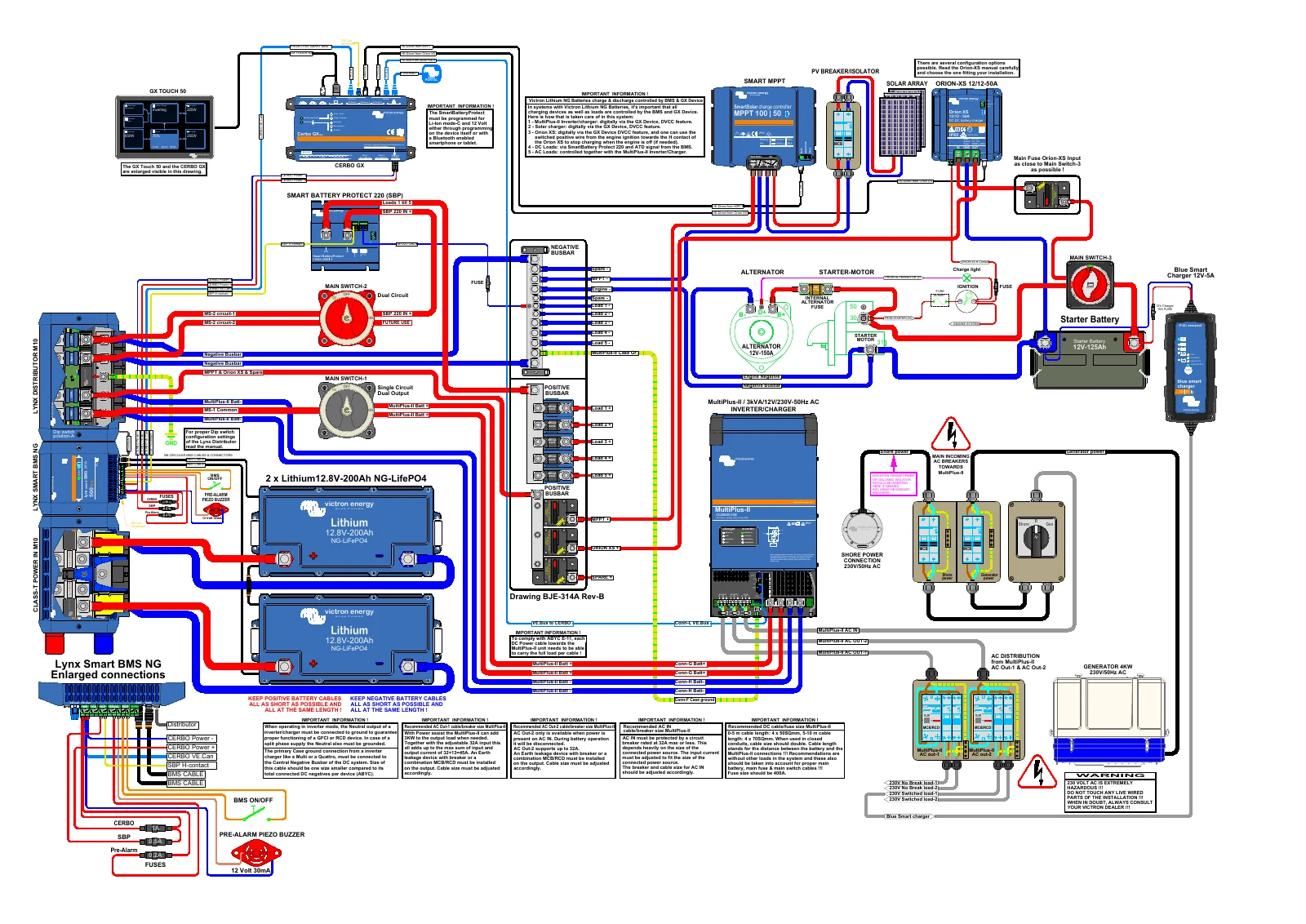
MultiPlus-II, lithium storage, solar charging, DC distribution and GX monitoring. Uses Victron lithium batteries and the specified BMS, not a Fogstar wiring arrangement.
Open schematic PDF 1 to zoomDrawing © Victron Energy. Reference example only.
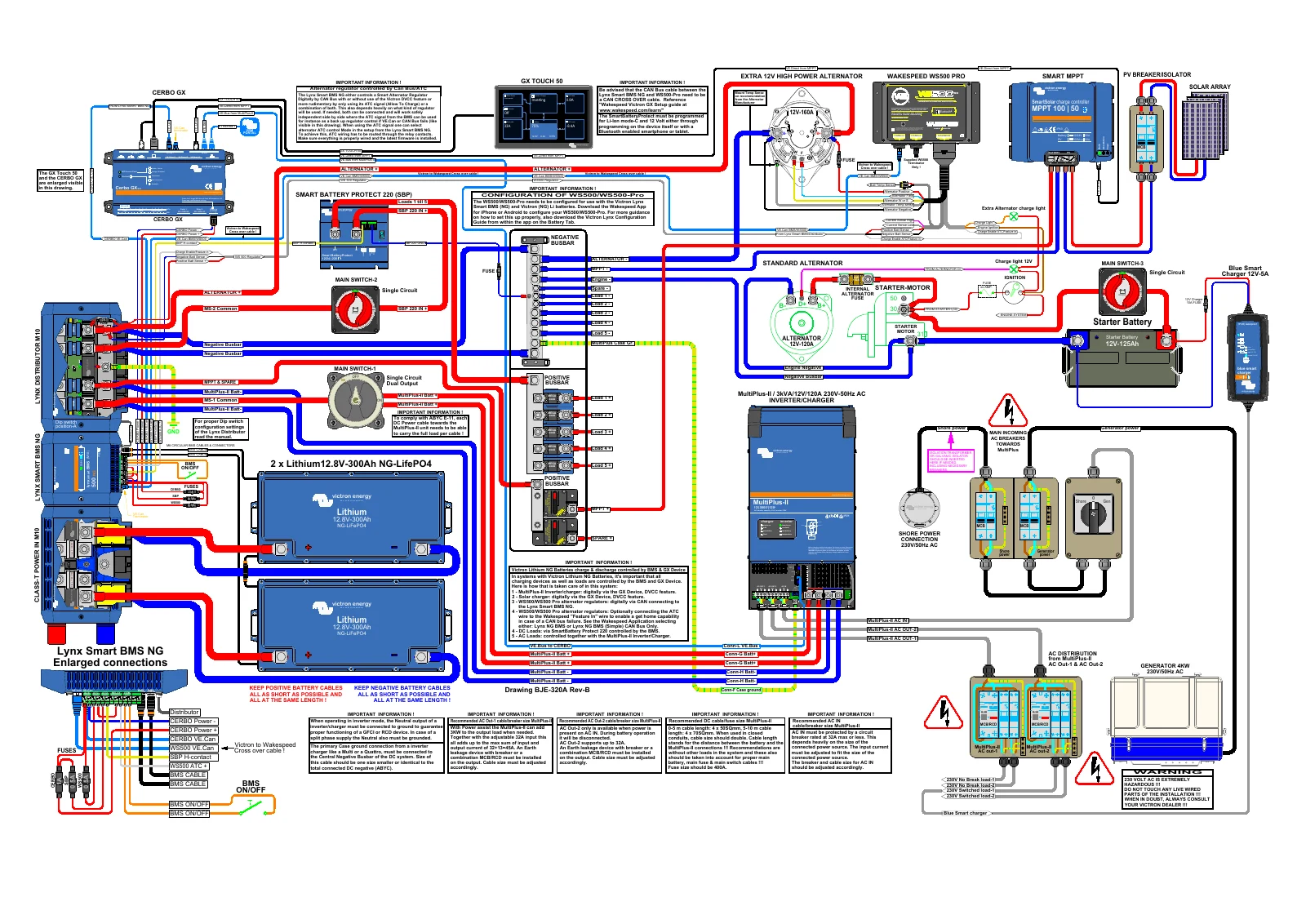
MultiPlus-II, lithium storage, solar charging, DC distribution and GX monitoring, with an additional alternator and regulator. Uses Victron lithium batteries and the specified BMS, not a Fogstar wiring arrangement.
Open schematic PDF 2 to zoomDrawing © Victron Energy. Reference example only.
A compatible Axiom can show battery information, solar production, shore power and electrical loads from a Victron GX system. Available controls depend on the equipment connected.
The Victron app integration uses a wired Ethernet connection between the GX device and the Raymarine network, with an appropriate RayNet adapter. Wi-Fi alone does not provide this app connection.
Victron documents support for Axiom, Axiom Pro and Axiom XL running LightHouse 3 or 4, with LightHouse 3.11 as the minimum. We check your exact display, software and network before quoting.
NMEA 2000 / SeaTalkng is a separate route for selected battery and tank data. It does not provide the same app view as Ethernet. We select the connection method to suit what you want to see.
Read Victron’s Raymarine integration guide
Explore electronics installationCall or email to discuss your electrical, electronics, solar or lithium project. Include your boat’s location so we can talk through the next steps.